


Student app walkthrough
A child signs in on a school Chromebook, opens the next lesson, watches the video and answers the quiz that follows.
6
Question types in every quiz
3
Ways to connect a classroom
1
Dashboard for every campus
0
Internet needed to keep learning
A four year old opens a Chromebook, signs in with a picture login and hears the lesson read to them. They tap, listen, watch and answer, and a badge appears the moment they get it right. No typing, no worksheets to chase, no waiting for the teacher to mark anything.
The whole programme follows the Oxford curriculum, so what a child does on the device matches what the class is teaching that week. Teachers keep the lesson plan they already know. Shama carries the practice, the repetition and the record of who has understood what.

Manage your school’s learning system from one place.
Save staff and teacher time with automated tasks.
Track student progress in real time.
Reduce paperwork and manual work.
Manage one campus or multiple campuses easily.
Keep students interested with interactive lessons.
Allow students to learn online or offline.
Motivate students with rewards and achievements.
Help schools continue learning even with limited internet.
Support your school as it grows.
Shama LMS runs on the Chromebooks your school already has, and on tablets. A child signs in, picks up the lesson where they left it, listens, watches, answers and earns. Everything a student needs sits in one app, and the whole Oxford-aligned course stays on the device when the connection drops.
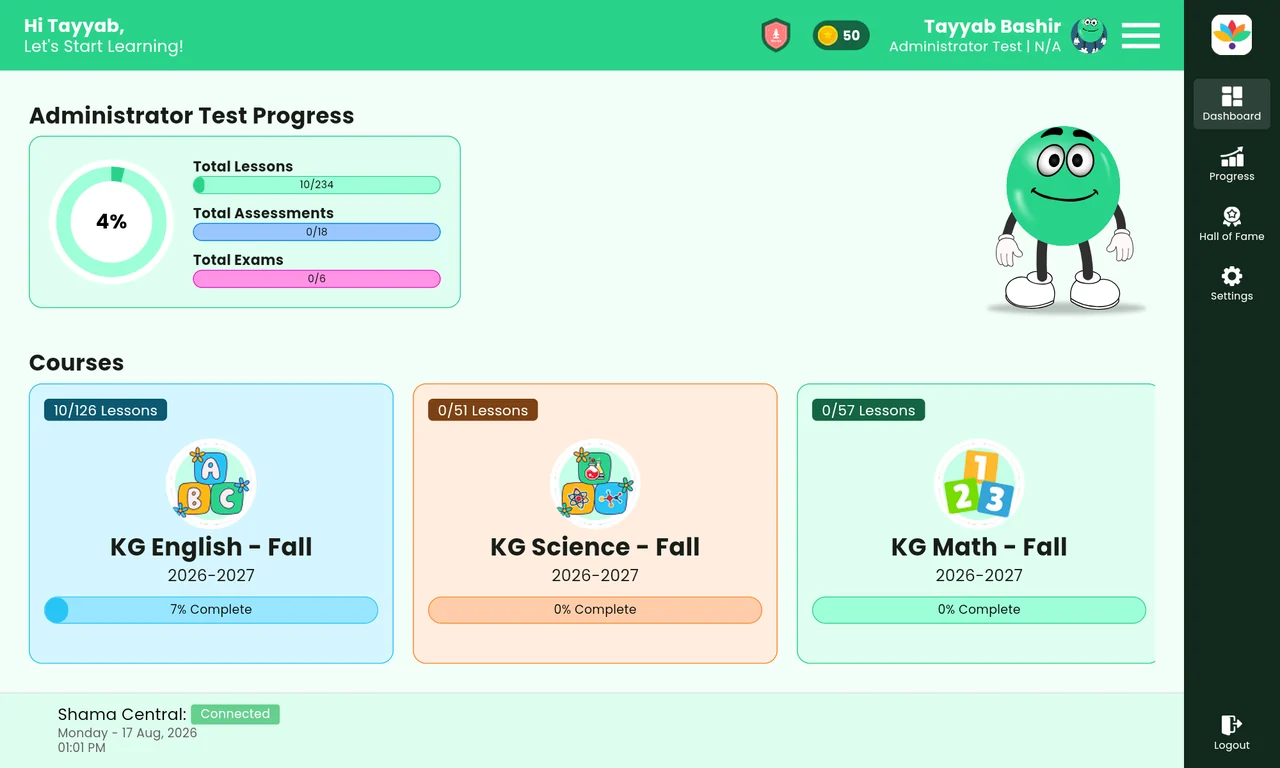
01
Learning does not stop after a video. Six question types cover multiple choice, true or false, fill in the blank, short answer, match the pairs and counting, all answered by tapping, so a child tests understanding straight away.
02
As children learn they earn badges, achievements and recognition. Everything they have won is on show in the Hall of Fame, which gives a real sense of accomplishment and a reason to carry on.
03
A friendly cartoon character travels with the student through the app and reacts to what the child is doing, turning an educational tool into company for the lesson.
04
Shama notices when a student has finished a set of lessons or spent a long stretch learning, then offers a small game or a fun video before the next lesson begins.
05
Each student sees what they have completed, what they are learning now, what remains and how far they have come. Learning becomes a journey with a shape, not a folder of videos.
06
Every child has their own secure login, so one Chromebook or tablet trolley can move from class to class and each student still finds their own courses, progress and rewards.
Schools choose how students reach their learning content. Progress and content synchronise in the background as soon as a connection is available again.
Students use the internet to reach their courses and synchronise learning content and progress as they go.
Run Shama on a server inside the school. Students on campus reach the content without every device needing its own internet connection.
Content downloads to the device, so children keep studying wherever they are. When connectivity returns, Shama syncs progress quietly in the background.
Administrators build the programs, upload the lessons, enrol the students, assign the teachers and watch results come in. Management sees the whole school. Teachers see their classes. Nobody sees more than they need to.

Teachers, administrators and management each get their own login and see only the information they need.
Student performance, course progress, assessment results and reports in one view, ready for decisions.
Create programs, organise semesters, enrol students, promote them to the next level and open a new academic year quickly.
Create lessons and add videos, activities, quizzes and exams without any technical knowledge.
A shared library of lessons and activities can be used across many courses, which saves hours of preparation.
Student profiles, academic records, parent information, photos and progress reports live in one place.
Manage teacher profiles, course assignments and staff information without spreadsheets.
Run several campuses from a single platform while each campus keeps its own organisation.
Create and manage academic years and terms while historical records stay intact.
Track the tablets, Chromebooks and laptops assigned to a campus or to a student.
Decide exactly who can view and who can manage each area of the system.
Assessment results and progress reports export cleanly for parent meetings and management review.
Pick a walkthrough on the right. Each one is a few minutes and shows the real screens, nothing staged.
A child signs in on a school Chromebook, opens the next lesson, watches the video and answers the quiz that follows.
Multiple choice, true or false, fill in the blank, short answer, match the pairs and math problems, all inside the lesson flow.
Badges and achievements as a child progresses, and the Hall of Fame where everything earned is on show.
A lesson downloaded to the device, studied with the connection switched off, then progress syncing quietly when it returns.
Programs, courses, students, teachers, campuses, devices and reports managed from one login.
Most digital learning stops at one idea: give the student content. Shama goes further and brings the Oxford curriculum, assessment, motivation, progress tracking, offline access and engagement together in a single piece of software.
For a school it is not one more app. It is the learning system for the early years: structured Oxford-aligned content, children working at their own pace on Chromebooks or tablets, support for places where connectivity is limited, and a classroom experience they look forward to.
Shama is built and supported by Zilon International, Inc., working with schools across Pakistan.
Sample figures shown for layout review. Final plans and prices will replace these.
PKR 15,000 / month
One campus, up to 150 students
PKR 35,000 / month
One campus, up to 600 students
Custom
Unlimited campuses and students
Something not covered here? Write to us in the contact form below and we will answer the same week.
Yes. Lessons, videos and quizzes download to the device, so a child can keep studying with no connection at all. When the device is online again, progress and new content synchronise in the background.
The student app is built for school Chromebooks and also runs on laptops and tablets. The management dashboard opens in any modern browser.
No. Lessons, videos, activities, quizzes and exams are added through simple forms, and content from the shared library can be reused in any course.
Yes. One platform holds every campus, each with its own students, teachers, classes and devices, while management keeps a single view across all of them.
Only the people your school allows. Permissions decide who can view and who can manage each area, so a teacher sees their classes while management sees the school.
Most schools are teaching on Shama within two weeks: accounts and campuses first, then courses and enrolment, then a short training session for teachers and administrators.
Send the details and we will come back with a walkthrough, a plan recommendation and a rollout timeline for your campuses.
Phone
Company
Zilon International, Inc.
Serving schools across Pakistan